v1.26.1051.1
Released 2026-07-08
Stable
Download
New & Improved
- Dark Mode setting added. Affects all windows in PgTgController. Defaults to "Light Mode" (If changed, close and relaunch the PgTgController from the desktop shortcut for change to take effect,)
- Meters window and Device Control now follow the new "Dark Mode" setting. If you liked the Dark Mode for these two windows, you can re-enable it in Settings/Options tab
- Meters and Device Control - The "Right-click for Options" prompt is now a mouse-over hover text, and not always displayed. It was obscuring the window title if the width was reduced to very narrow sizes. As before, just right-click anywhere in the title bar to get the context window.
- The Registration code entry was changed to use a popup window instead of edit-in-place. Clicking on the new "Modify" button will open a new window that allows Add/Update/Delete actions. If you typo'd your registration code or want to remove codes, you can now do that easily from the new popup window. Note, that PgTg will test all codes entered, and if one is found that is valid for the radio that is associated, it will be used. You can enter registration codes for multiple radios, and PgTg will try to find a match for the radio that it is connected to.
Bug Fixes
- The font size options in build #1042 caused some text to be truncated. Also, the Meter bargraph name text was shifting the left edge of the bars in horizontal layout. These issues have been resolved.
- The "Multiple power reading 3x in Radio meter displays when using KPA500" was not properly gated when using KPA1500. If it was enabled and using a KPA1500. the power readings in the Meters window were being divided by three! This has been corrected so it only will take effect when using the KPA500. The WebService now exposes true power readings regardless of the value of this option. You may have to adjust your Node-Red flow scale to reflect this change.
- A bug has been resolved that caused the AMP icon in SSDR to switch to Green-Operate when sending a Tune carrier with the amplifier in Standby mode.
- I let the new Claude Fable LLM take a look for possible memory leaks and orphaned references-- and it found and resolved a handful of new possible issues. It is weird as I had ran the same prompt using Claude Opus 4.6 over build #1042 and it had already fixed what it found then. (It is fixing the issues that the prior LLMs coded.)
v1.26.1042.1
Released 2026-06-19
Stable
Download
New & Improved
- Meters window now has optional vertical layout like Device Control. Also, 3 font size choices added.
- Meter bargraphs now have more hash markers for scale.
- Meters and Device Control - Window title bar now displays hint to Right-click for Options menu.
- TUNE button - Tested working with changes made by FlexRadio in SSDR v4.2.20.
Bug Fixes
- A bug fix resolving an issue that kept some Registration codes from being accepted after trial expires.
v1.26.1039.1
Released 2026-05-04
Stable
Download
New & Improved
- No new features were added in this release. The only focus was solving the TUNE button snafu in SSDR v4.2.18.
Bug Fixes
- TGXL Panel (in SSDR) - TUNE button fixed! Also affected Maestro ATU button and Function Key assignment using "Tuner Tune"
v1.26.1033.1
Released 2026-04-29
Stable
Download
New & Improved
- Plugin Manager - Connect test feature added. When clicked, the service is stopped, and all active plugins will be tested for sanity. Detects if KPA500/KAT500 ports are swapped. Otherwise can a connection be made via TCP or COM.
- Device Control Panels for Tuners now have a "Tune" command button. This invokes the Tune cycle that is currently broken with Flexradio SSDR v4.2.18 release. The TUNE button in SSDR (PGXL panel), the ATU button on Maestro and M radios do not work after updating to v4.2.18 This will be resolved soon.
Bug Fixes
- Settings - The configuration setting for "Tune Carrier Watchdog Timer" that was added in the previous release wasn't taking effect. This has been resolved.
v1.26.1028.1
Released 2026-04-14
Stable
Download
New & Improved
- Settings - Power Control tab - Amp/Tuner Power up/ Shutdown Behavior can now be set to target the Amp, Tuner or both.
- Settings - Options Tab - Tune Carrier Watchdog Timer is now adjustable. PgTg has a watchdog timer that forces the radio back into RX mode if a Tune Cycle does not complete or the Tuner does not return the "tuning is finished" message after a timer expires. This timer was hardwired to 15 seconds. You now may tweak that value down if needed, especially with third party plugins for devices that do not return the "tuning is completed" message.
- Device Control - Fan speed widget buttons have been reduced in width to reduce wasted space and allow the window to be slightly narrower.
- Trial Days Extended - Since most of the trial periods will start to expire exactly during Dayton Hamvention week, I have added 15 days to the trial. I will not be able to respond to Registration requests while I'm at Xenia!
- External plugins from Brian, N3OC now available for RFkit and SPE Expert amplifiers
Bug Fixes
- Installer - Changed the Installer to build statically linked to C++ runtime. This should avoid "missing DLL" error that occurs when the Installer is run on a VIRGIN Windows installation. Windows does not ship with the C++ Runtime included. Many programs install it so it was overlooked for the main stream of users.
If you need to manually install the Visual C++ redistributable, the download link for the file is:
https://aka.ms/vc14/vc_redist.x64.exe - Device Control - Command buttons now serialize the command string with polling commands being sent to the device. This avoids mangling that could occur due to the background polling of the device. Result is clicks should now always be processed instead of being dropped.
- Device Control - A bug has been resolved that caused the command buttons to remain disabled after clicking the Power button from On, to Off, and back to On
- Power Control - A workaround has been added to catch a boundary condition of PgTg being started with SDR Clients already connected to the radio. PgTg tracks connections but didn't account for existing Clients. It only knows about them when they first connect. This issue caused the Shutdown action to not fire. It's an edge case.
v1.26.1014.1
Released 2026-04-06
Stable
Download
New & Improved
- Controller - The positions of the Device Control and Meter windows are saved, when the Controller is closed. If open at that time, they will reopen when the Controller is relaunched.
- Controller - Device Control window - A 1.5x size option has been added along side with the new 2x size.
- Controller - Device Control window - On devices that have a Fault button, when a fault occurs, a brief message will appear in the radio client/Maestro with fault code and description if available. You can hover the mouse over the Fault button to see the message again. Clicking the Fault button will clear the fault on the device.
Bug Fixes
- Controller - Device Control window - When the device is powered off from it's native panel, the Device Control buttons will now display in the inactive color.
v1.26.1007.1
Released 2026-03-28
Stable
Download
New & Improved
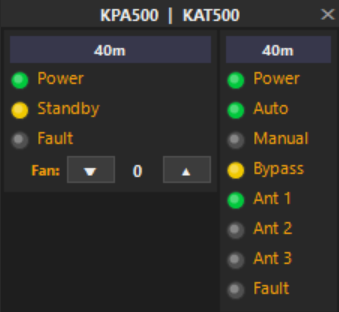
- Device Control Window in Controller - Many UI changes have been made to the Controller window to make it easier to see, move and change layout mode. The tiny buttons have been removed. You can now move the window by left-click anywhere on the title bar a drag it where you want. To change layout mode, a right-click context menu has been added to select your preference. For the KPA1500 and KPA500, fan control buttons have been added. The Band label indicates the current band selected in the device.
- Meters Window - SWR bars - The missing 1.5 hash mark has returned to duty. It was reported AWOL since deployment.
- Finally, the Device Control architecture has been expanded to support External Plugins! Software developers can now define LED action buttons to perform actions on their own devices. (This is actually a BIG DEAL for third party plugin support)
Horizontal Layout with window width dragged smaller, causes the devices to stack over-under instead of side-by-side

Vertical Layout
Bug Fixes
- Controller - Device Control window - A bug was found in the position persisting code that kept the window from being reopened where it last was positioned. This bug has been resolved.
- Controller - Device Control window - When the fault button when clicked, it was sending an incorrect command to the KAT500. Turns out it's different (FLTC;) than the KPA500 and KPA1500 commands (FLC;). The feature should now correctly clear a fault condition of the Tuner.
- PgTgGpio plugin - Two new trigger actions have been defined. 1 - "Clients Connected", sends active high to the designated Output Channel when one or more SDR clients are connected to the radio. Goes inactive when all clients have disconnected. 2 - "Amp Wakeup/Shutdown", sends active high to the designated Output Channel if the amp/tuner has been commanded to power up. Stays active until Shutdown command is sent using the timer option.
- Controller - Device Control window - The WebSocket server in the PgTgBridge service has been redesigned so it avoids disconnecting the Device Control window every 60 secs! The culprit was the Websocket endpoint used for the Device Control window (/device) is a Push-on-change design. If no changes were needed to be sent out, the WebSocket would reset the connection after 60 seconds of inactivity. This has been resolved. (thankfully)
- Workaround - It has been determined that the Flexradio does NOT reliably send the "transmit" message when the VFO is changed. This message contains the Transmit Slice frequency. This buggy behavior affects the amp and tuner tracking of the frequency. A slightly unsavory workaround has been added to attempt to keep the amp/tuner apprised of the active slice frequency by using the RX frequency. This affects the tuner more than the amplifier which only needs the "band". Until Flex resolves this issue, the workaround will have to stay in place.
- Tuner Only - If you had the Amplifier Integration disabled (because you only needed PgTg to control a tuner), the frequency updates were not being sent to the tuner. This bug has been resolved.
v1.26.1001.1
Released 2026-03-23
Stable
Download
New & Improved
- New Feature - Power Up/Down Control . Amplifier and Tuner can now be configured to power up when an SDR client connects, and power down with a configurable delay after client disconnects. Also power up sequences can be completely disabled. (It will be on you to turn them on) Or you may choose existing behavior of power up when Plugin loads. (Basically always on)
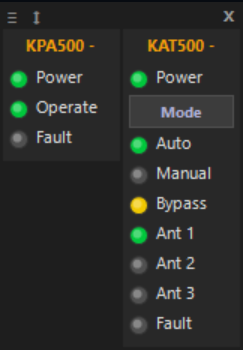
- New Feature - Device Control Window in Controller. A new floating window has been added for direct control of the KPA1500, KPA500 and KAT500. Panels are visible based on enabled Plug-ins. Front panel actions have been replicated for access to options like changing modes, antenna ports and monitoring for faults. Stays on top, and remembers position and layout. The labels are clickable and perform the direct action to the device. Click the "↔" or "↕" to swap layout. Drag the window with "≡"
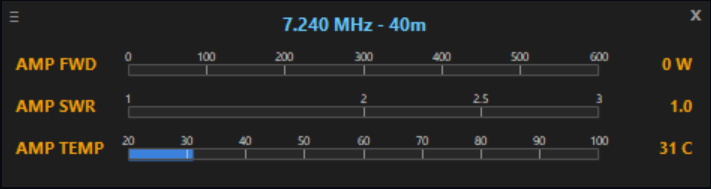
- The Meters window has been enhanced for better readability. Hash marks with values provide scale for readings.
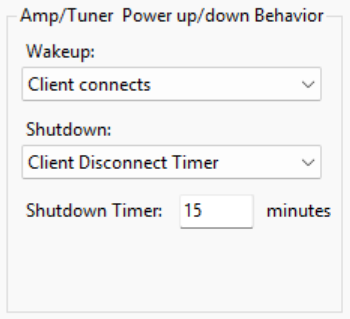
Horizontal Device Control

Vertical Device Control
Bug Fixes
- Controller - When the Autostart option is unchecked, when host machine is rebooted, PgTgController menus were disabled. This has been resolved.
- An edge-case bug has been resolved that could cause the PgTgBridge Service to not correctly identify the correct Ethernet interface. The IP address was defaulting to localhost.
v1.26.999.1
Released 2026-03-17
Beta
Download
New & Improved
- Controller - When hovering over the tray icon, the popup balloon help text now indicates the radio nickname it is configured for.
Bug Fixes
- Plugin - Air Monitor plugin was not sending correct command syntax. It was prefixing "$" to all commands. (CAT mode tested and is fully working. Icom CI-V mode not tested yet)
- Clarification - The key amplifier during radio tune carrier option is only applicable when PgTg is controlling PTT over the Network or by GPIO plugin. If you have an RCA cable connected from the radio TX1-3 to the amplifier PTT input, PgTg cannot execute this option!
v1.26.996.1
Released 2026-03-14 (Happy Pi Day!)
Beta
New & Improved
- PgTgBridge resource management process improved. Shutdown steps are now sequenced in preferred order.
- Controller - Pops up reminder if you try to launch it from the shortcut twice.
- Plugin for Air Monitor added — Allows another radio to track the transmit frequency and mode for monitoring your transmitter. Serial, TCP, CAT and CI-V supported!
- Plugin SDK public interface tested — Air Monitor is compiled using the public interface. Binary DLL included in deployment.
- Plugin SDK sample projects published on GitHub including fully implemented SampleAirMonitor project.
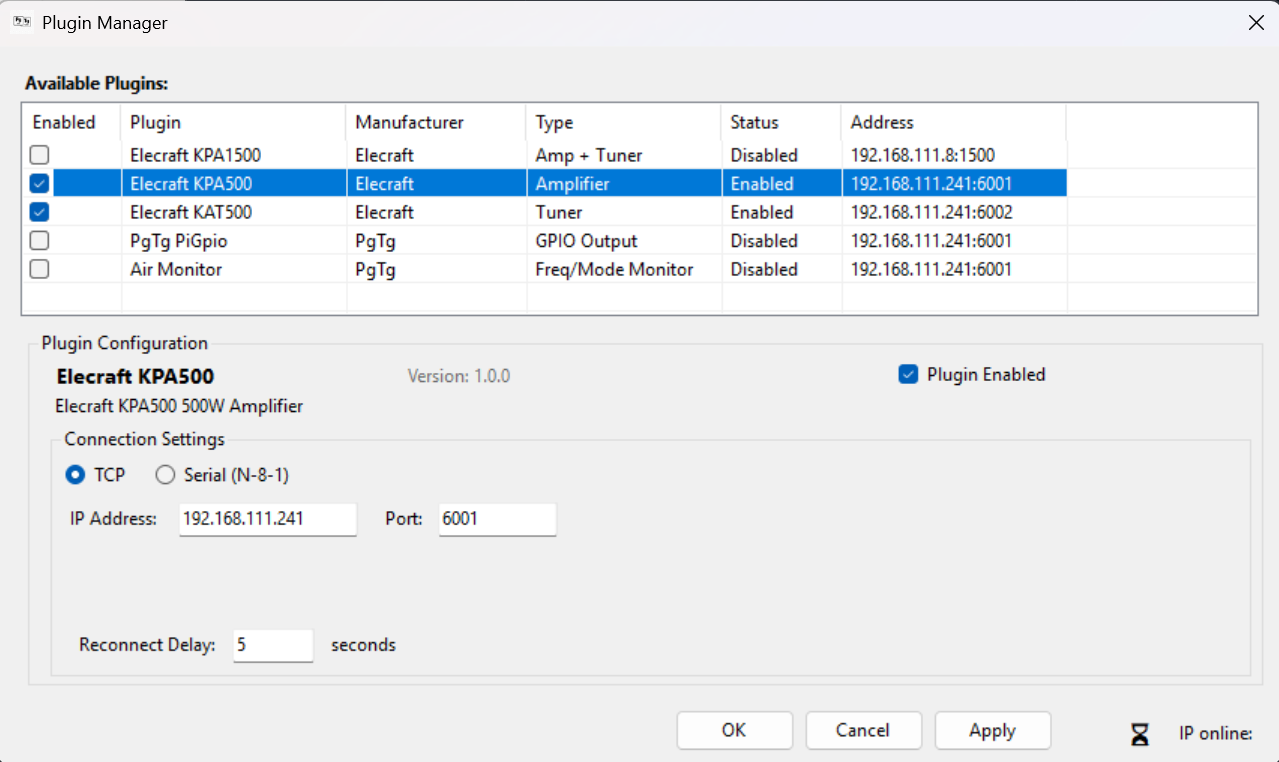
- Plugin Manager - External Plugins can now define which options are displayed when selected.
- Plugin Manager - Master/Detail layout changed to over/under style. Provides more room for plugin options. Yes, you can configure your KPA500 and KAT500 to be accessible via TCP. See PgTgBridge Installation Guide.
Bug Fixes
- Plugin Manager - Plugins now can have your own version numbering. PgTg will now load them by name only.
- KPA1500 / KPA500 - The internal plugins for these amplifers now enforce the minimum firmware version required for PTT over Network mode. If not sufficient, PgTg will disable the option for PTT over Network to avoid Interlock errors from radio.
- Clarification - The key amplifier during radio tune carrier option is only applicable when PgTg is controlling PTT over the Network or by GPIO plugin. If you have an RCA cable connected from the radio TX1-3 to the amplifier PTT input, PgTg cannot execute this option!
v1.26.984.1
Released 2026-03-10
Beta
New & Improved
- No new feature changes in this build.
- Behavior change - The initial value for the "Key amplifer during radio Tune Carrier" has been changed to Unchecked".
Bug Fixes
- Fixed button action assigned to Operate button in SSDR Tuner panel. The button was not staying in synchronization with the TUN icon/button on Task Bar.
- Refactored reconnection logic to properly restablish connection to the radio when the radio is power cycled.
- Fixed a bug in the About Box that caused the remaining trial day counter to not accurately display the correct value.
- Removed some extraneous log entries relating to calculated KAT500 power values.
v1.26.983.1
Released 2026-03-07
Beta
New & Improved
- Promoted to public release — Build #983 milestone achieved after multi-station beta testing.
- Band-change propagation is now fully automatic for all supported radios and hardware combinations.
- Band-specific Operate/Standby power control — each band can have an independent power limit and operate mode behavior.
- FlexRadio Aurora™ series support included (beta designation, see Aurora news post).
- Tray meter panel now reports Forward Power (W), SWR, and Amplifier Temperature with live refresh.
Bug Fixes
- Fixed rare race condition where band-change message could arrive before amplifier serial port was ready, causing a missed transition.
- Fixed tray application not reflecting service stopped state after a Windows restart.
- Fixed KPA1500 SWR meter returning zero on first read after service start.